


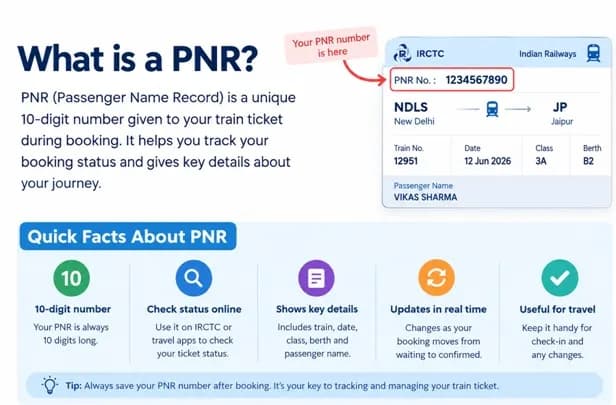
A PNR (Passenger Name Record) is a 10-digit number linked to your reserved train booking, which is shown on IRCTC ticket and can be used to check your PNR status.
A PNR (Passenger Name Record) is a 10-digit number linked to your reserved train booking. You can use it to check your PNR status, see whether a ticket is confirmed, RAC or waitlisted, and view coach and berth details when they are available. On an IRCTC ticket, the PNR is shown at the top-left corner. For a PNR status check, enter this 10-digit number in the Indian Railways PNR enquiry service or use the relevant IRCTC facility.
The scale of Indian Railways makes this information especially useful. According to the Ministry of Railways, Indian Railways carried 741 crore passengers during the financial year 2025-26, an increase of 3.54% compared with the previous year. With such a large number of journeys taking place across the network, digital reservation information has become an everyday part of train travel.
For a passenger, the PNR is essentially the reference point for checking reservation details after a booking has been made. You do not need to remember every detail printed on your ticket. Once you have the PNR number, you can use it to retrieve the latest information connected with your reservation and prepare for the journey accordingly.
What is a PNR Number?
PNR stands for Passenger Name Record. In the Indian railway reservation system, it is a 10-digit number associated with a reserved train booking. Think of it as the reference number for your reservation rather than as your train number, ticket number or seat number.
A single PNR can cover multiple passengers travelling under the same booking. This means a family booking made together may have one PNR even though several passengers are listed on the ticket. The PNR links those passenger details with the relevant journey information stored in the reservation system.
The number itself is not your confirmation status. Instead, it allows the reservation system to retrieve information such as the train, boarding details, class, booking status and current status. The information can change as reservations are processed, cancellations take place and the reservation chart is prepared.
Where Can You Find the PNR Number on Your Ticket?
Finding the PNR is usually straightforward. The official Indian Railways Passenger Reservation Enquiry page specifically states that passengers can find the PNR on the top-left corner of the ticket. The same page provides a field where passengers can enter the PNR to retrieve their current reservation information.
If you have an electronic ticket, you can usually find the PNR prominently displayed within the ticket or booking confirmation. It may also appear in the confirmation communication associated with the reservation. The important thing is to identify the 10-digit PNR rather than accidentally entering the train number, transaction number or another reference.
Keeping the PNR handy is useful when you are travelling with family or friends. Instead of searching through the complete ticket every time you want to check the reservation, you can simply enter this number into a PNR enquiry service and retrieve the relevant booking information.
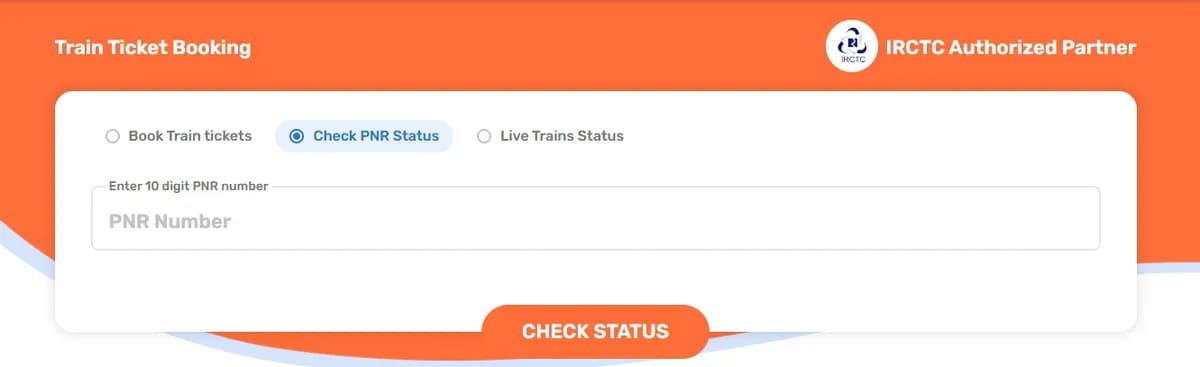
What Information Can You Check Using a PNR?
A PNR is useful because it brings several reservation details together. The official railway enquiry system displays information including the train number and name, boarding date, origin, destination, reserved destination, boarding point and class. It also shows booking and current status for the passengers listed under the reservation.
PNR Status Codes You May See
The result of a PNR enquiry can contain abbreviations that show the reservation position. Some common examples are:
Code | Meaning |
CNF | Confirmed |
RAC | Reservation Against Cancellation |
GNWL | General Wait List |
RLWL | Remote Location Wait List |
PQWL | Pooled Quota Wait List |
TQWL | Tatkal Quota Wait List |
The railway enquiry result can also show other status codes. If your ticket is waitlisted, do not rely only on the number beside WL. Check the full status shown against the passenger because the quota or status category can affect what the code means.
Why Use Goibibo for PNR Status Checks?
Goibibo makes PNR tracking convenient by allowing travellers to check their 10-digit PNR through its website without logging in. The platform can display booking-related information such as coach, berth and chart details when available, while the Goibibo app provides PNR functionality through its Trains section. This gives passengers a convenient way to access important booking information from their phone or computer.
Why Should You Check the PNR Before Your Journey?
A train reservation is not always static from the moment you make the booking. A ticket that starts on the waiting list may move through different stages as passengers cancel their reservations and available accommodation changes. Checking the PNR gives you a current view of the reservation instead of relying on the original booking status.
It is also helpful for group travellers. If several people are travelling under one booking, the PNR can help you review the status of the passengers together. You can see whether everyone has the expected reservation status and whether coach or berth details have been assigned.
Another useful reason is chart preparation. Indian Railways states that the current status may change until the final charts are prepared. Therefore, checking once closer to departure can help you identify any change that occurred after the original booking.
PNR Number vs Train Number
The PNR and train number serve completely different purposes, even though both appear on a railway ticket. The train number identifies the particular train service you are travelling on, while the PNR identifies your reservation.
For example, you might use a train number to find information about a particular service, its route or scheduled journey. The PNR, on the other hand, is what you use to retrieve the reservation details belonging to your booking.
This distinction is easy to remember: the train number relates to the train, while the PNR relates to your booking. If you want to check whether your own reservation is confirmed or find your allotted berth, the PNR is the number you need.
What Happens If the PNR Status Changes?
PNR information can change as the reservation process progresses. A passenger who initially receives a waiting-list status may later receive RAC or confirmed accommodation, depending on availability and the movement of the reservation queue. The final outcome can also depend on chart preparation and other reservation factors.
The official PNR enquiry system includes several categories of waiting lists, such as GNWL, RLWL, PQWL, RQWL, DPWL and TQWL. This means that simply seeing a waiting-list number is not always enough to understand the complete position. The accompanying status code also matters.
For this reason, passengers should look at the complete PNR result rather than focusing only on one number. The current status, booking status and charting information together provide a clearer picture of the reservation.
Keep Your PNR Handy Before Boarding
Your PNR is one of the most useful references on a reserved train ticket. The official Indian Railways enquiry system confirms that it can be found on the top-left corner of the ticket and used to retrieve booking and current journey information.
Before travelling, keep the 10-digit number easily accessible on your phone or ticket. A quick check can help you confirm the latest reservation status, review coach and berth information when available, and see whether charting information has been updated. This small step can make your final travel preparation much simpler.
(The views and opinions expressed in this guest article are solely those of the author and do not necessarily reflect the views of Eastern Mirror)